


Customer reviews aren’t just social proof, they’re a goldmine of insights that can shape product development, improve communication, and refine marketing. By using Airtable to centralize and categorize reviews, businesses can track feedback across platforms, identify recurring issues or trends, and even write more authentic copy in the language customers use. The result: smarter decisions, stronger credibility, and better customer experiences.
Table of Contents
Reviews are all around us; they impact our behavior, they impact our decisions. You can find it everywhere, and it’s sometimes hard to keep track of what’s being said about your business. It’s time to learn how to get the most out of it.
“About 95% of customers read reviews before making a purchase.“
How to approach all these reviews, where to even start?
Why are customer reviews even that important to us as a business?
Many people believe that customer reviews are important only to our customers who make decisions based on experiences shared by others who have used the product or service. However, customer reviews can help businesses a lot in many different ways.
We will go through the benefits that customer reviews bring to our business.
Find out what customers think about your products
– This one is fairly obvious and something that should come to mind first. However, it’s often overlooked. Going through reviews can help you see what products are popular, what features your customers like, and what features they dislike. It’s also great feedback that tells you how to improve your product or service. We often can’t look at our product or service objectively; we are emotionally attached to it, and customer reviews are there to be a reality check.
Use reviews to write trustworthy claims
– People believe other people more than they trust a business that talks about itself.
“76% of consumers are more likely to trust content shared by their peers rather than content shared by brands.”
Use this data to your advantage. Present your features or something you would like your customers to know in a way it is described with a user-generated review.
Write your copy and product description using the voice of your customers
– Similar to the previous point, you can write the entire copy of your website or the whole product description with words or phrases used by your customers.
Find the phrases that your customers use
When they talk about your products. How can that help you? Your products usually apply to groups with similar characteristics, and they use specific language or phrases to express their needs. They are also the ones who used the products for some time, and they know what they liked or what they didn’t like. Use that to your advantage and talk their language, show them that you understand them and their needs.
This is how we used user reviews to create copy for our client’s website.

This is an example of a review that was very useful to us. It described customer experience and told us what’s really important to them. It’s the nice terrace/patio covered with a wine arbor, its location – a shaded area, and quick and attentive staff.
We used that information along with information from other reviews to create paragraphs describing the restaurant.
This is what it looks like:

How to keep track of all the reviews that are coming
This part of the process is essential to getting the most out of customer reviews. We all know that reviews can come through all kinds of channels, social media, Tripadvisor, Amazon, etc. The first step is always to identify the source of your reviews are coming from. Once you know that, it’s time to store them in a way where you can easily approach them whenever you need them. It’s also important that you can filter all that data because once you have thousands of reviews, you can’t just waste time scrolling through them to find something specific.
That’s when Airtable comes in handy. If you have never heard of it before, it’s software used to create bases with a lot of features, plugins, and other solutions. It has a great free version that can suit pretty much all your needs, and it has the paid version that offers even more, but that’s a different topic.
This is the Airtable system modified to store reviews in a way where you can easily find out everything that was said.
Let’s start with the basics, and what do we have here, and why.
This is the whole base that you will be able to download and use; it’s located at the bottom of this blog.
This table inside the Customer Care base has the following columns.
Name of the record – Enables you to easily keep track of reviews by using a numbered list
Review link – It allows you to quickly find the origin of the review and to quickly access it. Not all review sites allow copying a link to a specific review.
Review text – Full text of the review
Review answer – Full answer to a review (if you answered the review)
Month of the visit – Displays the month in which the review was posted
Season – Displays the year in which the review was posted
Rating – Displays the numerical rating of the review, or in the case of some platforms, it’s just Recommended or De-Recommended
Arising issue – This allows you to select if there was an issue or not in the customer experience
Issued keyword – Place where you type in the keywords for the issue, if there was one
Positive stuff – Select positive things that the customer wrote in the review
Reviewer rating – Takes into consideration the experience of the reviewer and how often the reviewer leaves reviews. You can modify it however you want. For example, below 5 reviews = 1 star, between 6 and 15 reviews = 2 stars, 16 to 25 reviews = 3 stars, 26 to 50 = 4 stars, more than 50 reviews = 5 stars
Approved – Place where you select if the review answer is good to go online. This is used when you work in teams where the supervisor has to approve the text that goes online.
Completed – Check this field when the review is answered and when all the fields are completed.
Platform – Select the platform where the review was posted
If you need more options, you can always add new columns and customize them however you want. This is how you do it.

You can also modify every existing field and create a base that suits your needs. To do that, click the small arrow next to a column name and you will get a dropdown menu with an option to customize the field type.
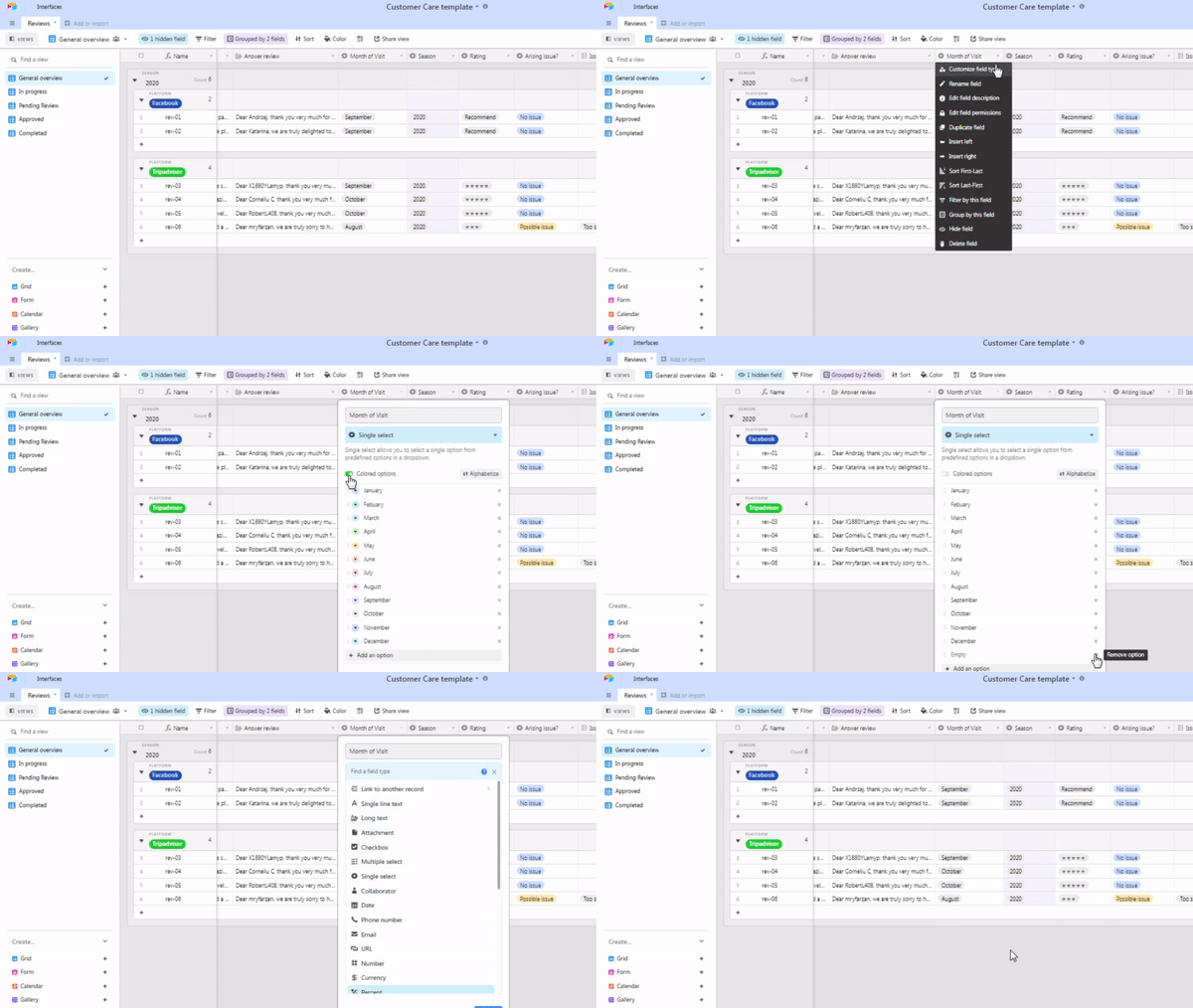
To find more technical details about editing fields, visit the official support page of Airtable, where everything is well explained.
You can find it by clicking here
How to group fields in the Customer Care database?
For the needs that we have, we decided that grouping reviews by year and by the platform where the review came from is enough. You can always add more fields to group your view.
It’s possible to do it in a few ways. You can either enter the dropdown menu the same way we showed you earlier and then select “group by this field,” or you can select the tab Group above the base and select which fields you want to group the table by.
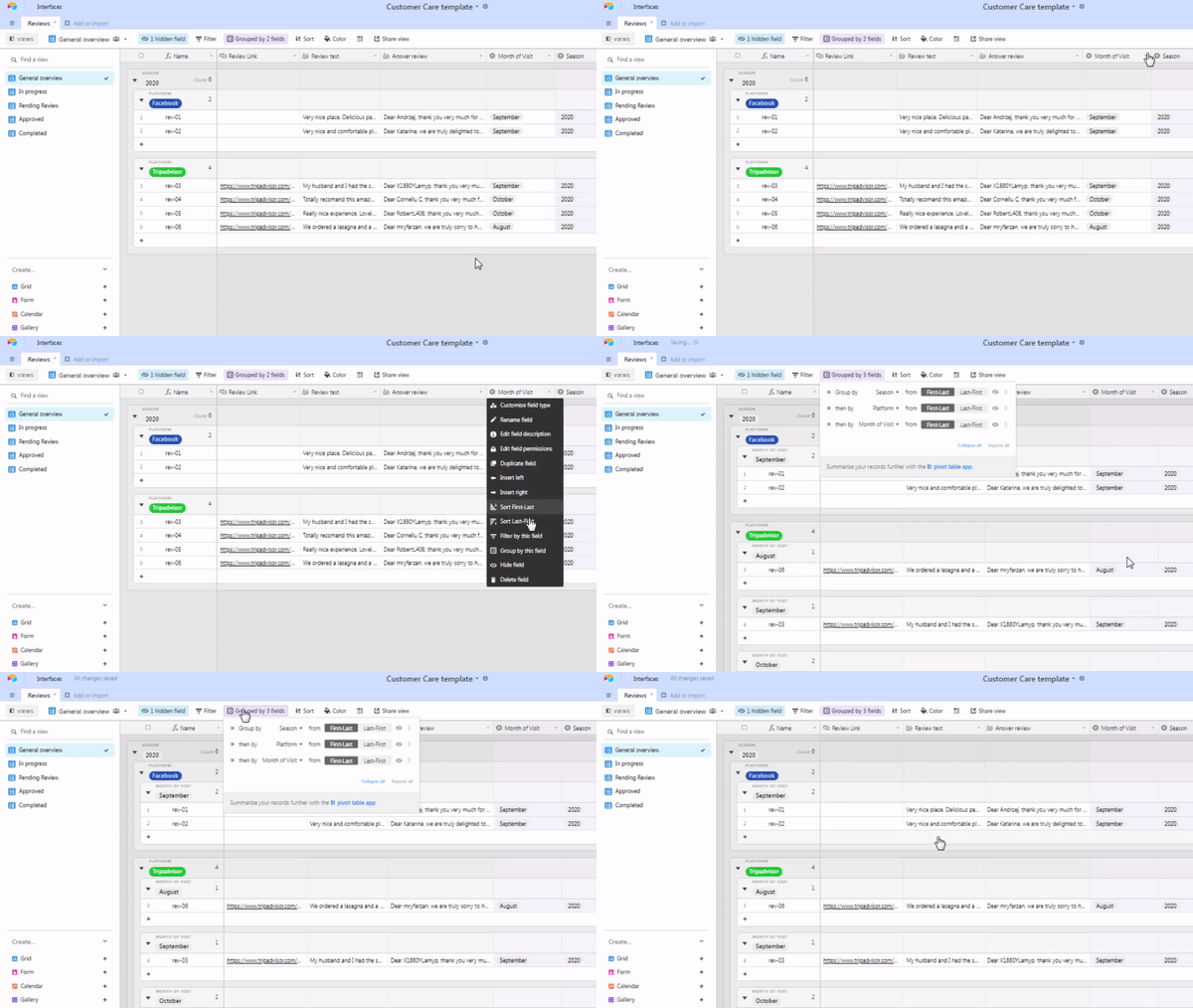
We finished setting up the technical stuff about the base. Now, let’s get to the part that will teach you how to get the most out of the customer reviews
Imagine a situation where you have thousands of reviews and you want to find out what things your customers love, what they don’t like, or have issues with. This base gives you the ability to do just that.
Let’s start with example number 1. Finding the reviews with possible issues. All you have to do is select the filter tab, press Add condition, select Arising issue, and then select a possible issue.
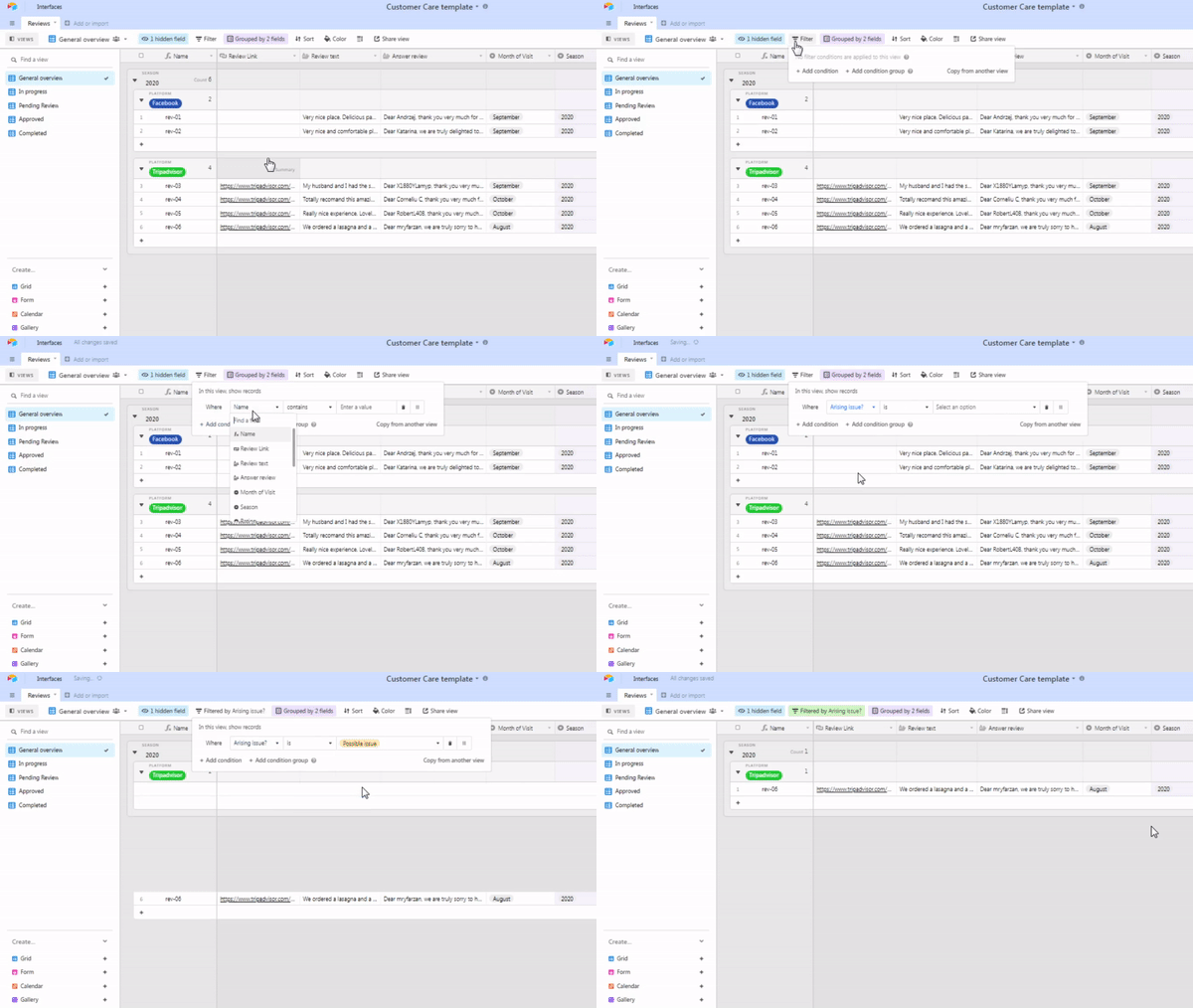
This filter will list out all reviews that were marked with a possible issue marking. That will allow you to go through all of those reviews and notice if there are things that repeat often.
You can repeat the process for any field, you can add more conditions to filter the table in a way you find suitable in certain situations. This way of storing and monitoring the customer reviews can also give you a great insight into how your service is evolving through the years, whether you are making the same mistakes, have you improved as time goes by, or whether your new products have flaws or not. It’s all in here, and you can find it out in a matter of seconds.